Three Ways to Turn a Database Into a REST API
Three Ways to Turn a Database Into a REST API

If your database needs to become a REST API, you have typically three options: an auto-generated gateway for prototypes and internal tools, a cloud data API builder when you want managed auth and telemetry without writing endpoint code, or a custom API (or a governed enterprise platform) when compliance, complex business rules, or audit requirements are non-negotiable.
- Prototype or internal tool: point a schema-introspecting gateway at your database and get CRUD endpoints in minutes.
- Standard production back end: use a cloud data API builder for managed auth, monitoring, and REST plus GraphQL.
- Regulated or complex enterprise app: use a custom API or a governed platform like Jundago that handles ABAC, audit trails, and multi-cloud deployment.
The common thread across all three: treat the database as the source of truth, and let the API layer reflect it rather than duplicate it. The OpenAPI standard makes that reflection portable across tools.
Pro Tip: Spin up a local gateway against a copy of your schema before touching production. You’ll know within an hour whether auto-generation covers your case or whether you need custom logic.
Key Takeaways
The right way to expose a database as a REST API depends on scale and compliance needs: gateways for prototypes, managed builders for standard apps, and governed platforms for regulated production systems.
| Point | Details |
|---|---|
| Match tool to stage | Use a schema-introspecting gateway for prototypes, a cloud data API builder for standard back ends. |
| Database views protect data | Expose views instead of raw tables to mask PII and keep API shape stable through schema changes. |
| RLS beats API-layer checks | Push row-level security into the database itself so it can’t be bypassed by a misconfigured route. |
| Version early, deprecate loudly | Freeze contracts with OpenAPI, use /v1//v2 paths, and give clients real lead time before removal. |
| Consistent errors save integration time | Use standard HTTP codes plus one uniform error body shape across every endpoint. |
| Choose Jundago for regulated deployments | Jundago pairs AI-generated APIs with built-in RBAC, ABAC, and multi-cloud governance for compliance-heavy production use. |
Table of Contents
- How Do You Turn a Database Into a REST API?
- When Should You Use an Auto-Generated API vs. a Custom One?
- What Security Controls Does a Database REST API Need?
- How Do You Connect a Database and Deploy a Secure REST API?
- When Do You Need an Enterprise API Platform Instead?
- How Do You Version a Database-Backed API as Your Schema Changes?
- How Should You Handle Pagination, Filtering, and Sorting?
- What Should Error Responses Look Like?
- An Editorial Take: Why Auto-Generation Isn’t the Finish Line
- Get a Governed API From Your Database, Not Just an Exposed One
- Where to Go Next for Implementation Details
- Sources
How Do You Turn a Database Into a REST API?
Three categories of tools handle the database to REST API conversion, and picking the wrong one costs you weeks of rework later. Each category makes a different trade between speed and control.
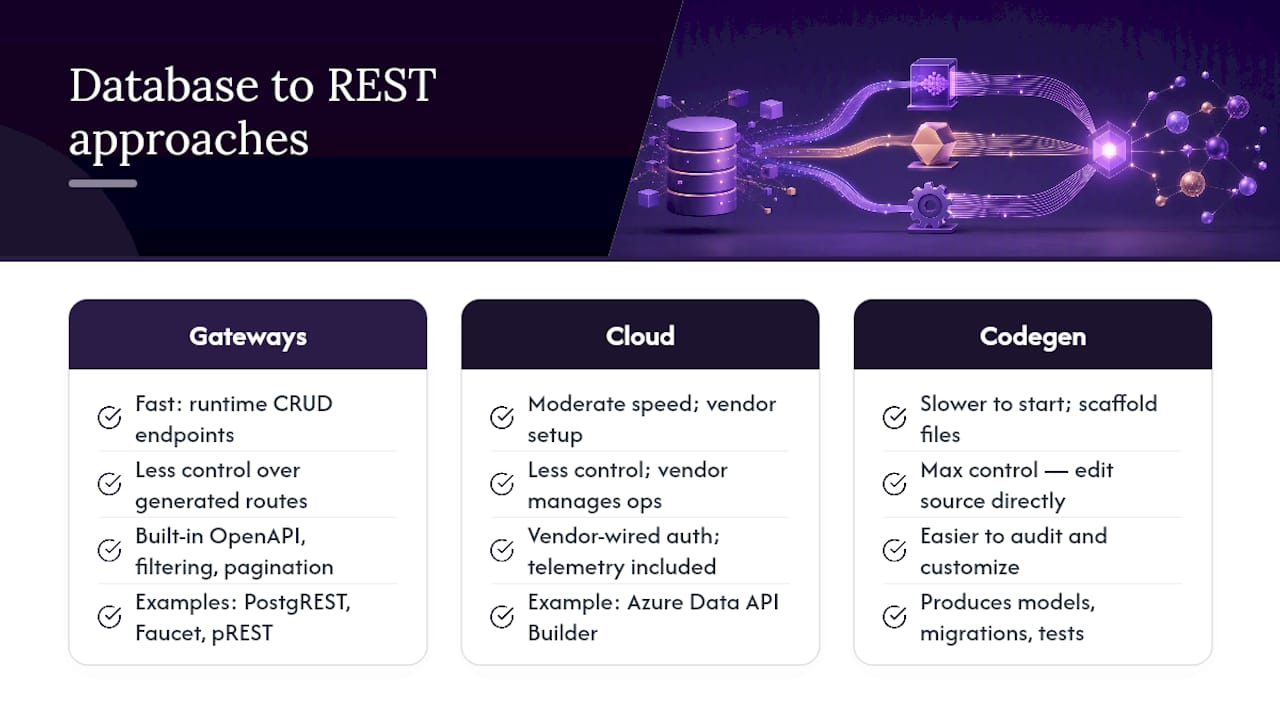
Schema-introspecting gateways connect directly to your database, read the schema at runtime, and generate CRUD endpoints without you writing a line of route code. PostgREST is the reference example for Postgres: it inspects tables, views, and functions, then exposes them as resources with built-in filtering, pagination, and OpenAPI documentation. Faucet extends the same idea across multiple SQL engines in a single self-hosted binary, adding role-based access control and even a Model Context Protocol server so AI agents can query your data safely. pREST takes a similar approach with built-in auth, access control lists, and custom SQL routes for cases the auto-generated endpoints don’t cover.
Cloud-managed data API builders shift the operational burden onto a vendor. Azure Data API Builder generates REST and GraphQL endpoints side by side from a JSON configuration file, wires in authentication providers, and gives you telemetry out of the box, so you’re not standing up your own monitoring stack.
Code generators and scaffolders sit at the other end: they produce actual source files, language-specific models, migration scripts, and sometimes test suites you own and modify directly, rather than a live introspection layer.
Whichever category you evaluate, check for OpenAPI export, supported auth methods, RBAC, row-level security (RLS) support, and whether views or stored procedures can be exposed as first-class endpoints.
When Should You Use an Auto-Generated API vs. a Custom One?
Run through this checklist before committing to an approach:
- Compliance scope. HIPAA, PCI DSS, or similar regimes usually demand audit trails and attribute-based rules that generic CRUD generators don’t provide natively.
- Business logic complexity. If most endpoints are straightforward reads and writes, auto-generation wins on speed. If half your endpoints need multi-step validation, lean custom.
- Performance SLA. Auto-generated queries can be inefficient against large joins; a custom or hand-tuned data layer often performs better under load.
- Team skillset and timeline. A two-person team shipping in a week should start with a gateway, not a bespoke framework.
A prototype dashboard fits a local PostgREST instance. A standard internal admin tool fits a cloud data API builder. A hospital records system with row-level access rules fits a custom or governed platform.
Pro Tip: You don’t have to choose one path exclusively. Put a thin custom facade in front of your auto-generated endpoints, and only the handful of routes that need real business logic get custom code.
What Security Controls Does a Database REST API Need?
Authentication and authorization are two separate decisions, and conflating them is where most exposed databases get compromised. API keys work fine for server-to-server calls with low rotation needs; OAuth2/OIDC handles user-facing apps that need delegated access; JWTs carry claims efficiently across microservices without a round trip to a token server.

Authorization is where it gets interesting. Role-based access control (RBAC) answers “what can this role do,” while attribute-based access control (ABAC) answers “does this specific request, from this specific user, against this specific row, satisfy policy.” Row-level security (RLS) pushes that second question into the database itself, which is often the more defensible place to enforce it since it can’t be bypassed by a misconfigured API route.
Beyond auth, a handful of operational controls separate a safe deployment from an incident report:
- Parameterized queries and input sanitization to block injection, non-negotiable regardless of tool.
- Rate limiting to stop scraping and abuse before it becomes an outage.
- Schema change detection so a silent column rename doesn’t silently break a client contract.
- Locked OpenAPI contracts so consumers know exactly what changed, and when.
PostgREST’s own documentation is candid that auto-generated CRUD often needs a middleware layer bolted on to handle dynamic, attribute-based rules cleanly. Budget for that layer from day one rather than discovering the gap in a security review.
How Do You Connect a Database and Deploy a Secure REST API?
The sequence below works whether you’re running PostgREST locally or configuring Azure Data API Builder against a managed instance.
- Preflight. Back up the database, review the schema for orphaned tables, and confirm every table you plan to expose has a primary key and sane indexes. Missing indexes turn “fast prototype” into “timeout city” once real traffic hits.
- Connect and introspect. Set your connection string, start the gateway (
postgrest.conffor PostgREST, adab-config.jsonfor Data API Builder, or Faucet’s single binary pointed at your DSN), and hit the generated endpoints. AGET /api/customers?limit=10should return real rows immediately if the introspection worked. - Shape the API. Raw tables rarely match what a client needs. Build database views for the exact shapes you want to expose, and apply column-level masking on views to keep PII out of responses.
- Secure it. Turn on JWT or API key auth, apply RBAC and RLS, lock the contract with a versioned OpenAPI spec, and add rate limiting plus request logging before anything touches the public internet.
- Test and deploy. Run smoke tests against every route, verify auth actually rejects unauthorized calls (not just that it accepts valid ones), containerize the gateway, and wire it into CI/CD so schema changes trigger a review.
Auto-generation buys you speed on steps two and three. It does not exempt you from steps four and five. Treat security and testing as mandatory, not optional, regardless of how fast the endpoints appeared.
When Do You Need an Enterprise API Platform Instead?
The gaps that show up in every section above (ABAC enforcement, audit trails, governed CI/CD, multi-cloud consistency) are exactly what a platform-level approach is built to close, rather than something you patch on endpoint by endpoint.
Jundago’s API Studio generates REST, GraphQL, gRPC, or SOAP endpoints from natural-language intent rather than raw schema introspection alone, while GraphQL Studio adds AI-designed resolvers for graph-shaped data. EndPlex gives your team a native workbench with an AI assistant for testing and debugging before anything reaches production, and Command Center governs deployment across AWS, Azure, GCP, and Oracle Cloud from one place.
If you’re evaluating whether your team needs this layer, check for:
- Built-in compliance modules (HIPAA/HL7 FHIR, PCI DSS, KYC/AML) rather than generic auth alone.
- Governance automation that enforces policy-as-code, not manual review checklists.
- RBAC and ABAC controls that operate consistently across every generated API, not just the ones you remembered to secure.
Pro Tip: Ask any platform vendor how they handle a breaking schema change across a hundred existing client integrations. The answer tells you more about production readiness than any feature list.
How Do You Version a Database-Backed API as Your Schema Changes?
Schemas evolve. Client contracts shouldn’t break every time they do, and that tension is where most database-backed APIs accumulate technical debt.
The most durable pattern is versioning at the URL or header level (/v1/customers, /v2/customers, or an Accept-Version header) so old clients keep working against a frozen contract while you iterate on the new one behind a separate path. Auto-generated gateways make this trickier than hand-written APIs because the endpoints regenerate whenever the schema changes. The fix is to expose database views rather than raw tables. When a column gets renamed or a table gets split, you update the view definition, and the API shape stays stable even though the underlying schema moved.
Deprecation needs a real timeline, not a silent removal. Publish a deprecation date in your OpenAPI spec, return a Sunset header on deprecated routes, and give integration partners real lead time, often 90 days for anything touching billing or compliance data.
Schema change detection tooling matters here too. A gateway that silently regenerates endpoints on every migration is convenient in development and dangerous in production, since a column drop can quietly remove a field every client depends on. Lock your contract with a checked-in OpenAPI spec, and treat any diff between that spec and the live schema as a build failure, not a warning.
How Should You Handle Pagination, Filtering, and Sorting?
Return every row in a customers table with a few million records, and you’ll take down your own API before anyone else does. Pagination isn’t optional past a trivial dataset size.
Cursor-based pagination scales better than offset-based (?page=3&limit=50) once tables get large, because offset pagination forces the database to scan and discard every preceding row on each request. A cursor (?after=eyJpZCI6MTIzfQ) instead tells the database exactly where to resume, which keeps query cost roughly constant regardless of how deep into the dataset a client pages.
Filtering conventions should stay predictable and composable. PostgREST’s operator syntax (?age=gte.18&status=eq.active) is a solid model to imitate even outside PostgREST itself: every filterable column supports the same small set of operators, so clients don’t have to memorize per-endpoint quirks.
Sorting deserves the same discipline. A consistent ?sort=created_at.desc pattern beats bespoke sort parameters on every resource, and always define a default sort order. Undefined ordering means two identical requests can return rows in different sequences, which silently breaks any client doing incremental sync.
Cap page size server-side regardless of what the client requests. A limit=100000 parameter should be clamped to your actual maximum, not honored literally.
What Should Error Responses Look Like?
A REST API that returns HTTP 200 with {"error": "not found"} buried in the body forces every client to parse response bodies just to know if a call succeeded. Use HTTP status codes as they were designed: 400 for malformed requests, 401 for missing or invalid auth, 403 for valid auth without permission, 404 for missing resources, 409 for conflicts, 422 for validation failures, 500 for anything unexpected on your end.
Beyond the status code, a consistent error body saves your API consumers hours of guesswork. A shape like {"error": {"code": "VALIDATION_FAILED", "message": "email is required", "field": "email"}} gives clients enough structure to branch on code programmatically while still showing message to a human. Keep that shape identical across every endpoint. A client integrating against your API shouldn’t have to write different error-parsing logic for /customers versus /orders.
Never leak stack traces, SQL fragments, or internal file paths in production error responses. That’s not just an aesthetic choice. It’s a direct information leak to anyone probing your API for weaknesses, and it’s one of the more common ways schema details end up exposed by accident. Log the full detail server-side, and return only what the client actually needs.
An Editorial Take: Why Auto-Generation Isn’t the Finish Line
The pitch behind schema-introspecting gateways is seductive: point a tool at a database, get a working API in minutes. That part is true, and it’s genuinely useful. Where the conventional advice falls short is treating that moment as the end of the project rather than the start of the real work.
What gets underestimated consistently is the gap between “endpoints exist” and “endpoints are safe to expose to a client you don’t fully trust.” Auto-generation nails the first. It rarely nails the second on its own, because CRUD generators reason about tables and columns, not about who a specific caller is or what they’re allowed to see in a specific row. That’s an application-level judgment, and pretending a tool solved it because it produced OpenAPI docs is how sensitive data ends up in a response it should never have reached.
If there’s one thing worth prioritizing first, it’s deciding early whether your project will ever need ABAC, audit trails, or multi-cloud governance. Retrofitting those onto a prototype gateway is far more painful than choosing a platform built for them from the start.
Get a Governed API From Your Database, Not Just an Exposed One
Prototyping with a local gateway gets you fast feedback, and cloud data API builders handle the managed middle ground well. Where both approaches run out of runway is the moment your API needs to prove, on demand, exactly who accessed which row and why, across five regulatory frameworks and three cloud providers at once.
That’s the gap Jundago closes. API Studio generates REST, GraphQL, gRPC, and SOAP endpoints from natural-language intent instead of raw introspection, EndPlex gives your team an AI-assisted workbench for testing before anything ships, and Command Center governs every deployment across AWS, Azure, GCP, and Oracle Cloud from a single control plane. RBAC and ABAC come built in rather than bolted on after a security review flags the gap, and industry modules already cover HIPAA/HL7 FHIR, PCI DSS, and KYC/AML requirements out of the box.
If your database is heading toward a regulated production environment, not just a demo, start with Jundago and see how much of that governance work is already done for you.
Where to Go Next for Implementation Details
- PostgREST Documentation for schema-driven REST generation on Postgres.
- Azure Data API Builder for cloud-managed REST and GraphQL configuration.
- faucetdb/faucet for a self-hosted, multi-database gateway with RBAC.
- pREST readme for SQL-to-REST with auth and custom routes.
- Fielding’s REST dissertation for the architectural foundation behind every tool above.
Sources
- PostgREST Documentation
- faucetdb/faucet
- pREST readme
- Fielding dissertation on REST architectural style